

Registry Operators
Registry System Testing (RST) Version 2.0
Table of Contents
- Overview
Overview
Registry System Testing (RST) ensures that a Registry Operator (RO) is able to operate a generic Top-Level Domain (gTLD) in a stable and secure manner.
Every RO must demonstrate that it has established operations in accordance with the applicable technical and operational criteria prior to (a) delegation into the root zone of the Internet, (b) transition of the TLD between Registry Service Providers (RSPs), and (c) introduction of certain registry services.
Version 2.0 RST Service
Version 2.0 of the RST system has been developed to replace version 1.0 of the RST System which traces back its origin to the original Pre-Delegation Testing system established for the 2012 round of the New gTLD Program. RST v2.0 streamlines the RST process by implementing only automated tests and providing a fully automated, API-driven workflow. ROs interact with RST v2.0 through an API in a self-testing design, eliminating the need for human intervention.
RST v2.0 also revises and expands the test specifications, adds support for Registration Data Access Protocol (RDAP) and Internationalized Domain Name (IDN)-variant gTLDs, and removes support for WHOIS. It also provides test plans specifically for testing RSPs, Minimum Rights Protection Mechanisms, and Domain Name System Security Extensions (DNSSEC) operations.
RST Test Processes
This section describes the processes that will be followed in each testing scenario.
Pre-Delegation Testing
Pre-Delegation Testing (PDT) must be completed by a new RO before the delegation request can be submitted.
Following onboarding of the RO onto the Naming Services portal, ICANN org will create an RST Test object in the RST-API. The RO must then configure its systems, submit input parameters, and successfully complete a test run before a delegation request can be submitted.
Registry Services Evaluation Process
ROs must undergo RST as part of the Registry Services Evaluation Process (RSEP) for certain registry services, such as Registration Validation per Applicable Law with Proxy.
As part of the RSEP request processing, ICANN org will create an RST Test object in the RST-API. The RO must then configure its systems, submit input parameters, and successfully complete a test run.
Registry Service Provider Evaluation
Applicants in the Registry Service Provider Evaluation Program must undergo RST before completing evaluation. Applicants will be tested separately for each type of RSP service (E.g., Main RSP, DNSSEC RSP, DNS RSP and Proxy RSP) they wish to offer to ROs, and (for Main RSPs) each IDN Table they wish to support.
Details of the processes relating to RSP testing may be found in the RSP Handbook.
Registry Transition (including change of Registry Service Provider(s))
If an RO wishes to add, remove or change one or more of its existing RSPs, then those RSPs may need to undergo RST, as per the Registry Transition Processes.
Definitions
- Test Subject: the entity (RO or RSP) whose registry system(s) are being tested.
- Test Object: an object in the RST-API representing a RST test.
- Test Plan: a collection of one or more test suites. Each test plan corresponds to a specific testing scenario, e.g. Pre-Delegation Testing, or RSP evaluation. Each Test Object is associated with one Test Plan.
- Test Suite: a set of test cases that verify the functionality of a specific aspect of a registry system, e.g. Extensible Provisioning Protocol (EPP).
- Test Case: a discrete test which verifies the functionality of a specific feature of a registry system, e.g. the EPP
<renew>command. - Test Run: the execution of all the test cases in a test plan, and the result of those test cases. A Test Object may have multiple test runs.
Test Lifecycle
In general, RST tests will follow the lifecycle described in the diagram below:
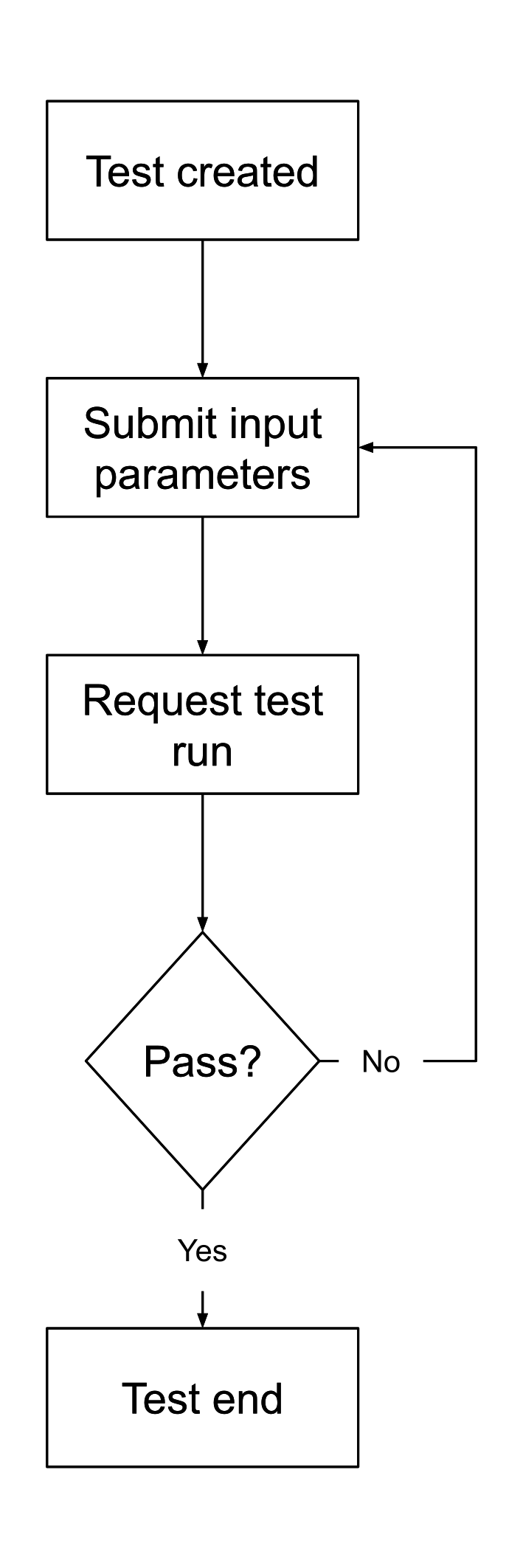
The lifecycle is designed to be self-service for test subjects (ROs and RSP applicants): once the test object has been created, test subjects must submit the required input parameters, and request test runs. If a test run fails, then the test subject can (once the underlying issue has been resolved), request a new test run.
Unless the specific testing scenario specifies a deadline by which a successful test run must be achieved, test subjects may request as many test runs as are needed in order to achieve a successful result.
Testing Procedures
During a test run, the test system will generate a linear test sequence based on the test suite(s) and test case(s) used by the specified test plan and executed in order.
If a test case produces any ERROR or CRITICAL messages, the test run will stop at that point.
Pass/Fail Criteria
In general, for a test to pass, all the test cases specified in the test suite(s) for the test plan MUST pass: if any fail, then the test as a whole will fail. A test case will fail if it produces one or more errors with the ERROR or CRITICAL severities.
Test Plans
Each testing scenario (as described above) has a corresponding test plan, which incorporates one or more test suites that are applicable to the critical registry functions that are being tested.
| Test Plan | Scenario | Aspect tested |
|---|---|---|
| Pre-Delegation Test | Testing registry infrastructure prior to delegation in the root zone. | DNS DNSSEC EPP IDN RDAP Data Escrow Integration |
| RSP Change Test | Testing registry infrastructure prior to a transition to a new RSP. | DNS DNSSEC EPP IDN RDAP Data Escrow Integration |
| DNS RSP Change Test | Testing DNS infrastructure prior to a transition to a new DNS RSP. | DNS DNSSEC |
| Standard IDN Test | Testing IDN implementation during RSEP. | IDN |
| SRS Gateway Test | Testing SRS Gateway implementation during RSEP. | SRS Gateway |
| Additional DNS Transports Test | Testing DNS over TLS, DNS over HTTPS, and/or DNS over QUIC prior to deployment. | Additional DNS Transports |
| Main RSP Evaluation Test | RSP Evaluation (Main RSP). | EPP RDAP Data Escrow Minimum RPMs |
| IDN Test (RSP Evaluation) | RSP Evaluation (Main RSP, IDN). | IDN |
| DNS RSP Evaluation Test | RSP Evaluation (DNS RSP). | DNS |
| DNSSEC RSP Evaluation Test | RSP Evaluation (DNSSEC RSP). | DNSSEC DNSSEC Operations |
| SRS Gateway RSP Evaluation | RSP Evaluation (Proxy RSP) | SRS Gateway |
Test Specifications
The RST Test Specifications fully describe each test plan, test suite, and test case in the RST v2.0 system, and provide useful information for test subjects wishing to understand how registry systems will be tested.
The specifications also include details of what input parameters are required for each test plan, the error codes that these plans can produce, and the circumstances under which each may arise.
The RST test specifications are maintained and developed on GitHub.
Note: releases of the RST v2.0 test specifications do not always align with releases of the RST v2.0 service, as it is often necessary to publish an update to the test specs before the corresponding update to the test system.
As described in the API spec, the testPlan property of test objects includes the version of the test specs that is used for performing tests. This can be used to determine which version of the test specs is currently deployed in the given environment (OT&E or production).
Input Parameters
Almost every test case requires information about the registry services being tested; for example, EPP server names, DNS server IP addresses, and server policies, in addition to information such as credentials for accessing those services.
Test subjects must collate and submit all the required input parameters for the test plan they are being tested against. The test specifications provide detailed information for each input parameter. All required input parameters MUST be provided before a test run can begin.
If the test run fails, these input parameters can be updated before the next test run begins.
File Uploads
Some input parameters are files: for example, escrow deposit sample files. These files must first be specified in the input parameters, after which they can be uploaded. For more information, consult the RST-API documentation.
Testing Environments
Each test plan indicates whether the test is to be carried out in the production environment, or whether a test, staging or Operational Testing and Evaluation (OT&E) environment may be used.
In general, test plans which are designed for "business as usual" use during the lifecycle of a TLD MUST be carried out in the production registry infrastructure, while RSP evaluation tests MAY be carried out in test, staging or OT&E environments.
Test TLDs for RSP Evaluation
RSP evaluation tests do not use existing or applied-for TLDs; instead, a unique TLD label will be defined for each test, based on the unique Application ID of the RSP application in the RSP Portal. These TLD labels will take the form zz--[type]-[number], where [type] will be replaced with the Application type. For example, a Main RSP Evaluation test will use a TLD of the form .zz--main-1234.
Test subjects will need to configure their registry systems to support this TLD prior to requesting a test run.
Useful Resources
Test subjects will need to configure their systems to be ready for RST. This will involve configuring registrar accounts, updating Access Control Lists (ACLs), and so on.
To facilitate this process, ICANN org has published a set of resources that will be useful to test subjects when preparing for RST. These resources are available in the "Resources" section of the RST test specifications.
Note: the contents of these resources may change from time to time, so users should consider implementing automatic retrieval and processing to avoid test run failures that may occur if a change to a resource has not been reflected on the test system's configuration.
Restful API
All interaction with the RST v2.0 system is via the RST-API. This is a RESTful API which allows test subjects to carry out all required tasks to complete RST.
Submitting Input Parameters
To submit input parameters, send an HTTP POST request to https://rst-api.icann.org/v1/test/{id}/inputs, replacing {id} with the test ID provided by ICANN org. The value of the content-type header of the request must be application/json, and the request body must be a JSON object whose property names are input parameter names, and whose property values are the input parameter values.
Example HTTP exchange:
POST /v1/test/f59b6490-84f6-4217-b36f-c54357359390/inputs HTTP/1.1
host: rst-api.icann.org
content-type: application/json

{
  "input.parameterName": "inputParameterValue"
}
Example command-line using cURL and jo:
jo input.parameterName=inputParameterValue | \ curl âdata-binary @- -H "content-type: application/json" \ https://rst-api.icann.org/v1/test/f59b6490-84f6-4217-b36f-c54357359390/inputs
Uploading Files
To upload a file, send an HTTP POST request to https://rst-api.icann.org/v1/test/{id}/files, replacing {id} with the test ID. The value of the content-type header of the request must be multipart/form-data, and the request body must be formatted as per RFC 7578.
Example command-line using cURL:
curl -F [email protected] \
  https://rst-api.icann.org/v1/test/f59b6490-84f6-4217-b36f-c54357359390/files
Requesting a Test Run
To request a test run, send an HTTP POST request to https://rst-api.icann.org/v1/test/{id}/run, replacing {id} with the test ID.
Example command-line using cURL:
curl -X POST \
  https://rst-api.icann.org/v1/test/f59b6490-84f6-4217-b36f-c54357359390/run
Checking the Results of a Test Run
To review the status and/or outcome of a test run, send an HTTP GET request to HTTP GET request to https://rst-api.icann.org/v1/test/{id}, replacing {id} with the test ID.
The response will be a JSON object containing information about the status and result of the test (in the status and result properties, respectively. For more information about the response, consult the API specification.
This endpoint may be used at any time during and after the test lifecycle, in order to access test object information.
HTTP status codes
The RST-API uses HTTP status codes to indicate the outcome of a request. In general, successful requests will produce 20X status codes; client errors will result in 40X status codes, and server-side errors will result in 5XX status codes.
For more information about which HTTP status codes will be used in which circumstances, please refer to the API specification below.
Authentication and Access Control
Access to the API is restricted to authorized users. Client access is authenticated using TLS with client authentication, meaning that the RST-API will authenticate the client using X.509 certificates in HTTPS. TLSA DNS resource records (see RFC 6698) are used to provide a mechanism to link the client certificate to be used.
To set up TLS Client Authentication, the RO must provide a DNSSEC-secured domain name (e.g., tlsa1.rsp.example). Depending on the testing scenario, this will be requested by submitting an inquiry in the RSP Portal or the Naming Services portal.
The RST-API uses the domain name to find the TLSA RRs to be used to validate the client during the TLS handshake.
The following combinations of TLSA Certificate Usages Registry, TLSA Selectors and TLSA Matching Types are supported:
| TLSA Certificate Usages Registry | TLSA Selectors | TLSA Matching Types |
|---|---|---|
| 3 | 1 | 1 |
| 2 |
The following public key algorithms are supported on the X.509 certificates used for TLS client authentication:
- RSA encryption with a key size of 4096 or higher.
- Elliptic Curve public key
The following signature algorithms are supported on the X.509 certificates used for TLS client authentication:
sha256WithRSAEncryptionsha384WithRSAEncryptionsha512WithRSAEncryptionecdsa-with-SHA256ecdsa-with-SHA384ecdsa-with-SHA512
Example
The first step is to generate an X.509 certificate and corresponding private key for the domain name to use in TLS Client Authentication for the RST-API. The following command will generate a client certificate for tls-client-example.example.com persisted in the file tls-client.crt.pem and a private key persisted in the file tls-client.key (a passphrase will be asked to protect the private key):
openssl req -x509 -newkey ec -pkeyopt ec_paramgen_curve:prime256v1 \
  -sha256 -days 3650 \
  -subj "/CN=tls-client-example.example.com" \
  -out tls-client.crt.pem \
  -keyout tls-client.key
Where:
reqcreates and processes certificate requests in PKCS#10 format. It can additionally, as in this example, create self-signed certificates.-x509outputs a self-signed certificate instead of a certificate request.-newkey eccreates a new certificate request and a new EC (elliptic curve) private key (usable both with ECDSA or ECDH algorithms).pkeyopt ec_paramgen_curve:prime256v1configures use of X9.62/SECG curve over a 256-bit prime field.-sha256specifies SHA256 to sign the request.-daysspecifies the number of days to certify the certificate.-keyoutthis gives the filename to write the newly created private key.-subjsets the subject name.CN: Common Name, in this example, the hostname of the TLSA DNS Resource Record (RR).-outspecifies the output filename for the certificate.
The second step is to generate a TLSA DNS Resource Record (RR) from the X.509 certificate. The tool danetool from the GnuTLS Transport Layer Security Library is used to generate the TLSA RR:
danetool --tlsa-rr --host tls-client-example.example.com \
  --load-certificate tls-client.crt.pem
Where:
--tlsa-rrprints the DANE RR.--hostspecifies the hostname of the TLSA DNS RR.--load-certificatespecifies the file with the certificate created in the previous step.
This will produce an output such as:
_443._tcp.tls-client-example.example.com. IN TLSA ( 03 01 01 2e472dd954df1c59dfa747a05afb649ff058cbf6ca8aef04f3eb46e9c0932602 )
The third step is to add the RDATA created in the previous step to a TLSA resource record to a DNSSEC-validated zone for the domain name to use in TLS Client Authentication (as opposed to the one listed by the danetool output). The client provides the hostname of the TLSA DNS resource record to ICANN for authentication and authorization of the client.
Note: the danetool command generates a TLSA record with a "tagged" prefix that includes a port and protocol, e.g., "_443._tcp". These SHOULD be omitted from the resource record(s) published in the DNS, and SHOULD NOT be included when communicating the TLSA hostname(s) to ICANN. In this hypothetical example, you would be communicating the following hostname to ICANN: "tls-client-example.example.com"
In this example, "nsupdate" is used to update the zone file (please note that nsupdate command is used for illustration purposes only and the tlsa resource record should be added with the applicable tool or method).
nsupdate
> server 127.0.0.1
> zone example.com.
> update add tls-client-example.example.com. 600 in tlsa 3 1 1 2e472dd954df1c59dfa747a05afb649ff058cbf6ca8aef04f3eb46e9c0932602
> send
> quit
Where:
- server, indicates the name server where to send the dynamic update requests.
- zone, specifies the zone to which updates are to be made.
- update add, adds a new resource record.
- send, sends the current message
We verify that the TLSA RR was correctly added by using a DNSSEC-validating DNS resolver:
dig @10.10.10.10 tls-client-example.example.com. tlsa +short +dnssec
	3 1 1
	2E472DD954DF1C59DFA747A05AFB649FF058CBF6CA8AEF04F3EB46E9
	C0932602

	[ . . . ]
An example of using "curl" with TLS Client Authentication is provided below:
	curl --cert tls-client.crt.pem --key tls-client.key
	https://...
API Specification
The RST API Spec fully describes each API endpoint, the required parameters, HTTP status codes, and JSON schemas for request and response bodies.
The API spec is written using Version 3.0 of the OpenAPI specification. This allows the use of code generation tools such as openapi-generator to automatically generate RST-API clients for many programming languages.
The RST API specification is maintained and developed on GitHub.
OT&E Environment
An Operational Testing and Evaluation (OT&E) environment is available to allow test subjects to (1) develop and test RST-API client implementations and (2) perform testing of their own registry systems. Access to this environment is available to ROs and RSPs, whether established or prospective.
To request access to the OT&E environment, you must first complete the steps listed above to generate and publish one or more TLSA records in the DNS for authentication. Then, you must submit the fully-qualified domain name(s) in a request to be onboarded onto the OT&E environment, either by submitting a general inquiry in the Naming Services portal (for existing ROs) or by emailing [email protected](for prospective ROs or Registry Services Providers). Once received, ICANN org will review the request and add the domain name(s) to the OT&E environment. This may take up to five business days as the OT&E environment is updated once per week.
Reporting Issues
For questions, comments, feedback or issues related to the API & test case specifications, please create new issues on the respective GitHub repository:
For issues with the functionality of the API, or the implementation of the test cases, please contact ICANN Global Support.
Rate Limits
Users in the OT&E RST v2.0 environment are limited to one concurrent test run. If you attempt to start a test run while another run is ongoing, the API will respond with a 429 HTTP status code.
Test Case Coverage
As of 24 February 2025, all test cases in all test suites have been implemented and deployed in OT&E, and are available for testing.
The table below shows the progression of coverage for each test suite over time:
| Test Suite | Coverage | ||||
|---|---|---|---|---|---|
| 2024-11-20 | 2024-11-25 | 2025-01-14 | 2025-02-05 | 2025-02-24 | |
| Data Escrow | 78% | 100% | 100% | 100% | 100% |
| DNS | 95% | 95% | 100% | 100% | 100% |
| DNSSEC | 94% | 100% | 100% | 100% | 100% |
| DNSSEC Operations | 0% | 0% | 100% | 100% | 100% |
| EPP | 58% | 65% | 88% | 100% | 100% |
| IDN | 0% | 0% | 80% | 100% | 100% |
| Integration | 66% | 66% | 100% | 100% | 100% |
| Minimum RPMs | 0% | 0% | 33% | 67% | 100% |
| RDAP | 93% | 93% | 100% | 100% | 100% |
| SRS Gateway | 20% | 40% | 43% | 64% | 100% |
Known issues
ICANN org is aware of the following issues, which will be resolved in a future deployment (last updated: May 28, 2026).
Users may also want to consult the list of planned changes to the RST test specs, and to the API spec.
- The dns-zz-consistency test case does not support DoT, DoH or DoQ. (NRRST-349)
- An edge case where two different files are simultaneously uploaded for the same input parameter can cause RST_EXCEPTION results. (NRRST-1318)
System Updates
ICANN org periodically updates the production and OT&E systems. A list of releases, and the changes that are included in those releases, may be found on the RST v2.0 Release Notes page.
Help and support
If you have any problems, questions, comments, or feedback relating to the RST v2.0 service, please visit the I Need Help page to find additional information, and ways to contact ICANN Global Support.